Why Is the Agent Loop a Plugin? Inside DeepSeek Harness's Plugin System
In DeepSeek Harness, even the Agent Loop is a Plugin.
TL;DR: In DSH, a Plugin is not an optional attachment to an otherwise complete application. It is a TypeScript module that Cordis mounts inside the same Node.js process with explicit dependencies and a managed lifetime. DSH uses Cordis to create the Context; Cordis then waits for Services, activates the Plugin, and withdraws its Effects when it leaves. The most common activation entry point is apply(ctx). A Tool is only one model-facing action a Plugin may register; the Tool Registry, Session, and even the Agent Loop are themselves Plugins.
Version note: This article was checked against DeepSeek Harness commit
47f94385on August 16, 2026. That commit corresponds todsh@0.1.0-rc.5. The project is still in developer preview, so later releases may change the design described here.
The word “plugin” usually assumes a host that can already run by itself. A browser can open pages before an ad blocker is installed. An editor can edit text before a theme or language extension arrives. Plugins add something around the edges.
That intuition fails immediately in DeepSeek Harness. The Tool Registry is a Plugin. Session is a Plugin. The Agent Loop that calls the model, receives Tool Calls, and advances the next turn is also a Plugin. These are not optional decorations. Remove any one of them and the Agent cannot do its ordinary work.
The real question is therefore not “Which plugins does DSH support?” It is: if the Agent’s core parts are all Plugins, what assembles them into a running system?
The answer is Cordis.
Cordis is the same-process Plugin framework underneath DSH. At startup, DSH establishes a Cordis Context, and the Cordis Loader imports configured TypeScript modules into it. A module declares the Services it requires, and Cordis activates it only after those dependencies are ready. The common entry point is apply(ctx); a Plugin that provides a Service may instead be a class. Through ctx, the Plugin consumes or provides Services and registers Tools or listeners. Those changes consequently belong to its lifetime.
Cordis is neither another Plugin inside DSH nor the context sent to a model. It is the framework that lets DSH Plugins enter the application, cooperate, and leave cleanly.
The same Cordis rules govern both a minimal Tool Plugin and a core component such as Agent Loop.
Putting these concepts inside a theater makes their relationship easier to see:
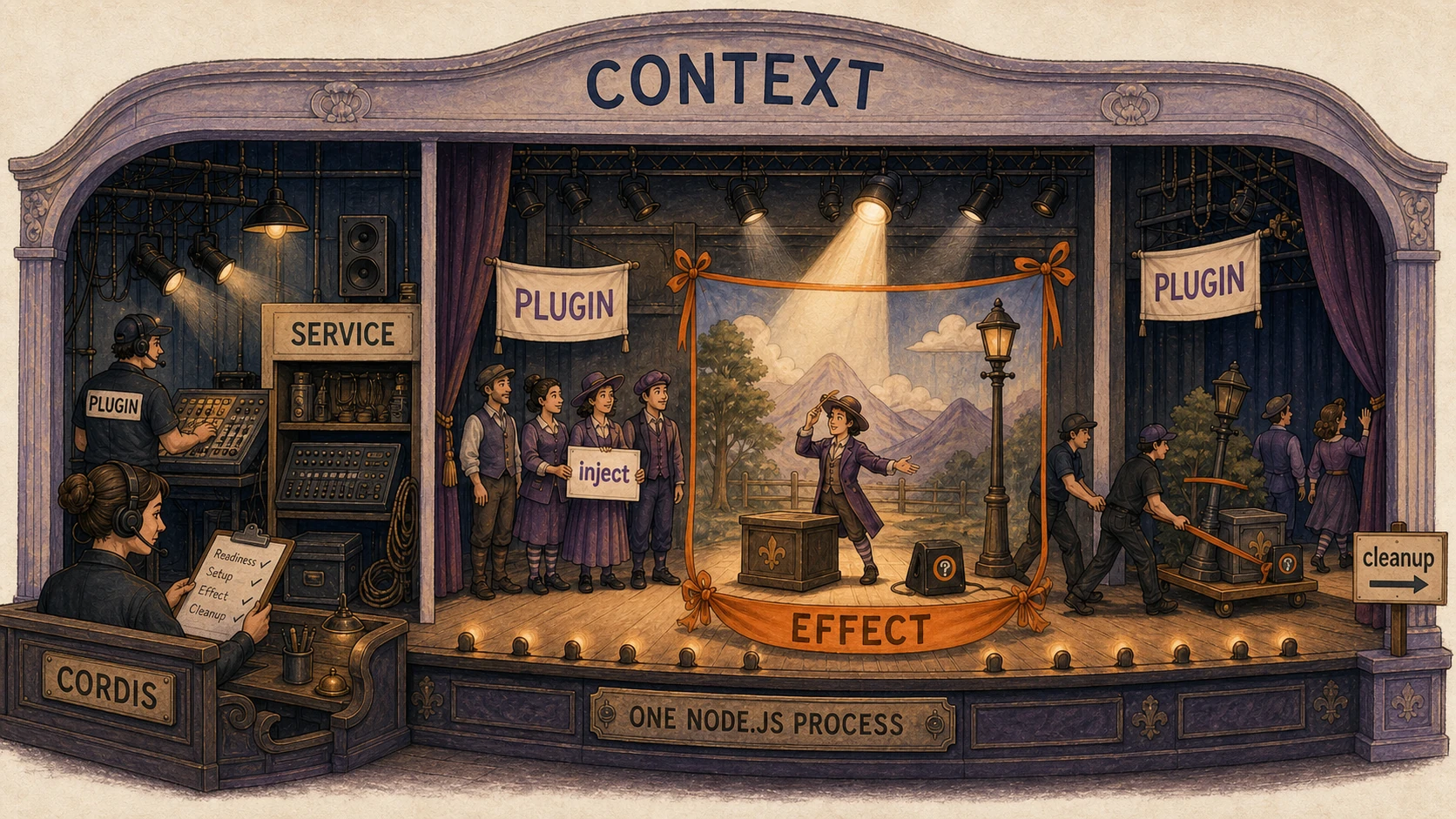
Figure 1. Context is the current scope. A Plugin is a troupe working there, Services are shared facilities such as lighting and sound, and inject is its pre-show technical rider. Like a stage manager, Cordis lets a Plugin begin once its Services are ready. An Effect is not a theatrical effect but a reversible change the Plugin adds, such as a Tool registration or event listener; cleanup is the logic that withdraws those changes when it leaves. The whole scene occupies one Node.js process. Its spatial layout represents scope, dependencies, and lifetimes—not network or process boundaries.
1. DSH uses Cordis to create a Context, then mounts modules into it
The official Cordis primer calls it “the vendored plugin framework underneath DeepSeek Harness.” “Underneath” defines the relationship. Cordis supplies loading and lifecycle rules. DSH supplies the concrete Session, Tool Registry, Agent Loop, and other modules. Cordis does not itself call the model or execute Tools.
The DSH boot implementation at the fixed commit makes the relationship concrete:
const ctx = new Context();
await ctx.plugin(Loader);
await mountRootInclude(ctx, absoluteConfigPath, patches);
Context and ctx.plugin() come from Cordis. Loader comes from the Cordis Loader package and first enters the root Context as a bootstrap Plugin. The third line asks that Loader to mount the full Plugin tree in DSH configuration. DSH’s boot layer selects the configuration and starts the process; Cordis turns those configured modules into a running system with dependencies and lifetimes.
The full path can be separated into six steps:
- DSH’s boot layer calls Cordis’s
new Context()to establish the root Context. - The boot layer mounts the Cordis Loader into that Context.
- The Loader reads a module entry from configuration and imports the corresponding TypeScript file.
- The module exposes a function, object, or
Servicesubclass and may declare dependencies through inject. - Once every required Service is ready, Cordis calls
apply(ctx)or constructs theServicesubclass. - The Plugin joins the application through
ctx; when it later deactivates, Effects recorded through Cordis helpers leave through the same scope.
This Context is not an LLM context window. It is a Plugin’s interface to the current application. ctx.tools refers to the Tool Registry currently in scope. ctx.llm refers to the current model capability. Other Services appear on the Context in the same way. Different scopes can see different Services, so Context determines both what a Plugin can use and where its changes belong.
That distinction also explains why a core component can still be called a Plugin. Cordis does not define Plugin as optional. A module is a Plugin when Cordis mounts it into a Context, activates it according to dependencies, and manages the resulting lifetime. Agent Loop is central, but it still follows that runtime contract.
2. Most Plugins enter the running system through apply(ctx)
The smallest useful Harness Plugin is just a TypeScript module. The repository’s official first-Plugin tutorial starts with this shape:
import type { Context } from '@deepseek-ai/cordis';

export const name = 'hello-plugin';

export function apply(ctx: Context) {
  console.log('[hello-plugin] plugin loaded!');
}
There is no Plugin base class in this example and no model interaction. The module exports a name and an apply function. A configuration row tells the Loader to mount that module. The Loader imports it and creates the Plugin’s lifecycle scope. If the module has no other dependencies, Cordis then calls apply(ctx).
That is the common function-style form, but Cordis accepts three shapes:
| Plugin shape | What the module exports | Where execution begins | Typical use |
|---|---|---|---|
| Function | Separate name, inject, and apply(ctx) exports | apply(ctx) | Registering Tools, listeners, or a small behavior |
| Object | A default object containing those fields | The object’s apply(ctx) | Keeping Plugin metadata in one object |
| Class | A default class extending Cordis Service | The class constructor | Providing a named Service to other Plugins |
“A Plugin is a TypeScript module” describes the loadable unit seen by a DSH developer. More precisely, Cordis mounts the function, object, or Service subclass exposed by that module. greet-tool uses the first form. Agent Loop uses the third. Both enter the same Context and lifecycle.
The ctx argument is the Plugin’s doorway into the running application. The Plugin can use Services that already exist on the Context, provide a new Service, register an event listener, add a Tool, or start some owned work. Because those changes go through the current Context, Cordis can associate them with the Plugin that created them.
Importing a module and activating a Plugin are separate events. A Plugin does not necessarily run when its file has loaded. If the module declares required Services, Cordis keeps it waiting until they all exist. Only then does apply(ctx) run.
The other important transition is from active to disposed. Suppose the Plugin uses Cordis helpers to register a Tool and an event listener. They become Effects owned by the current lifecycle scope and are withdrawn automatically when the Plugin unloads. A connection or native timer created directly does not gain that behavior by magic. The Plugin must place it inside ctx.effect() and return an explicit cleanup function.
So Context is more than a global object full of useful fields. It is also an ownership boundary. The same ctx that lets a Plugin change the application tells Cordis which changes must be taken back later. A Plugin is therefore not merely an importable file. It is a module activated by Cordis inside a scope whose lifetime Cordis manages.
3. Service, inject, and Effect connect multiple Plugins
A Plugin often needs another Plugin before it can do useful work. Cordis represents that relationship through a named Service.
DeepSeek Harness has Services named tools, llm, sessions, and agents. A provider claims one of those stable names on the Context. A consumer uses the name without importing or constructing that provider’s concrete implementation.
Consider a Plugin that wants to register a Tool. Its dependency declaration can be only one line:
export const inject = ['tools'];This line is not a JavaScript import. It is a runtime readiness condition: “Do not activate this Plugin until the current Context contains the tools Service.” When apply(ctx) eventually runs, ctx.tools is ready.
The rule stays live after startup. The fixed-version Service guide specifies two consequences when a required Service disappears:
- Cordis disposes the dependent Plugins.
- Cordis loads them again when the Service returns.
This is the part that most resembles service orchestration. The consumer declares what it needs, while the framework derives when it may run. Configuration order does not have to encode the dependency order by hand.
Effect completes the relationship. Service describes what a Plugin can offer. inject describes what a Plugin must receive. Effect records what the Plugin changes while it is active.
Imagine a Plugin that injects tools, then uses Cordis helpers to register two Tool definitions and one listener. It provides Tool definitions, but it is a consumer of the tools Service. Those three registrations belong to its lifecycle. If the Tool Registry disappears, Cordis deactivates the Plugin and withdraws all three. If the registry returns, the Plugin activates and registers them again. It never calls a global cleanup routine and never keeps using a registry that no longer exists.
Every part of this relationship remains inside one Node.js process:
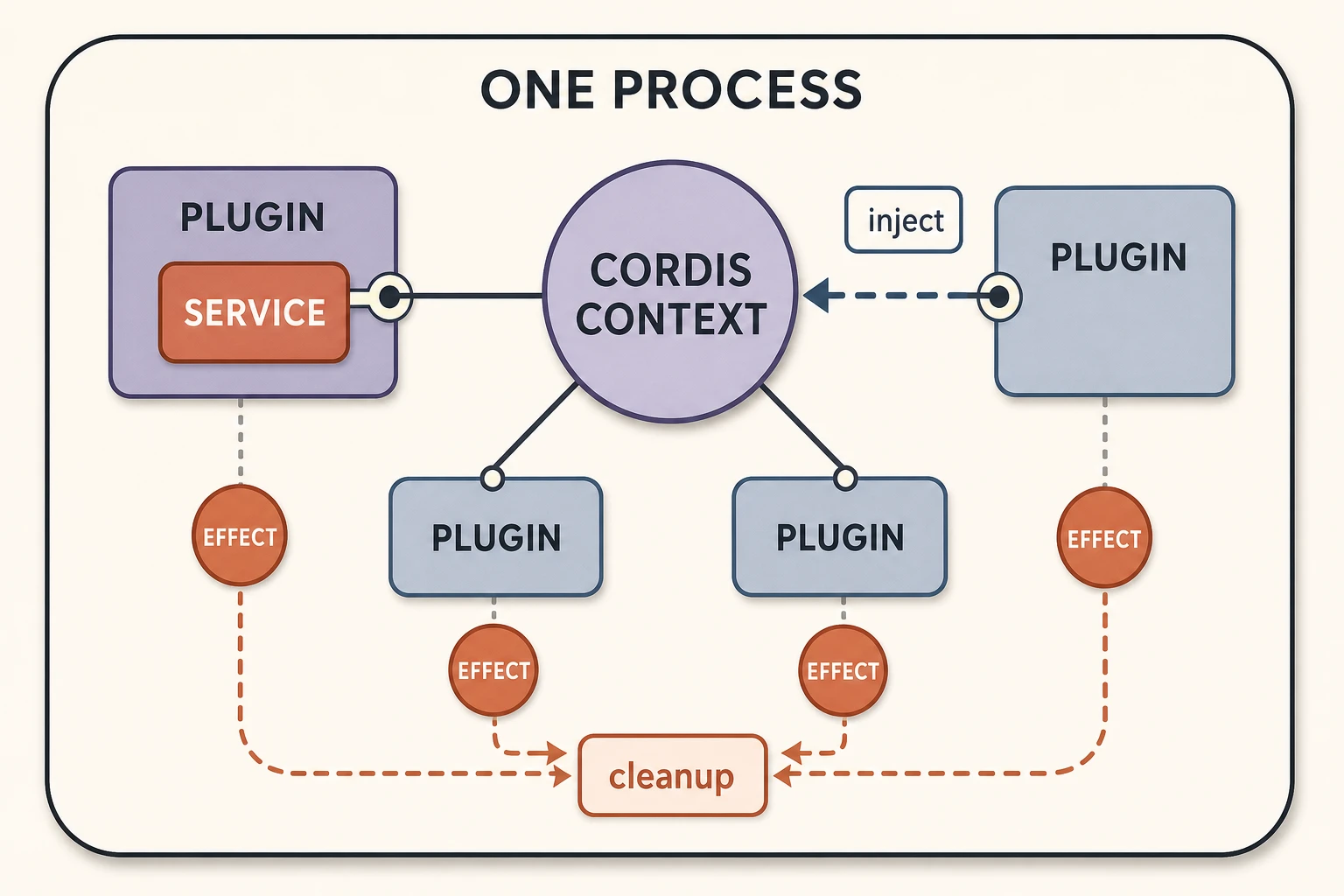
Figure 2. Plugins meet through one Cordis Context. Providers contribute named Services, consumers declare them through inject, and Plugin-owned Effects converge on cleanup.
Cordis resembles microservices only in how consumers depend on stable capability contracts instead of constructing concrete providers; both designs also separate providers from consumers. Cordis Plugins, however, are not independent servers. They are not deployed separately and do not communicate through RPC. They usually call Services directly or exchange in-process events. Cordis manages activation, scope, ownership, and cleanup rather than routing, health checks, or distributed failure recovery. More precisely, it is a same-process Service container with a dynamic module lifecycle.
This also explains replaceability more precisely than “Plugins are flexible.” A replacement provider can claim the same Service name. Consumers keep their dependency on that name, but Cordis restarts them against the provider now present in their Context. Whether the replacement is truly compatible still depends on the Service contract, event order, cancellation behavior, and result formats.
This distinction raises a common question: if a Plugin can add a Tool, are Plugin and Tool two names for the same thing?
4. The official greet example shows where Plugin ends and Tool begins
DeepSeek Harness’s official Build a Tool tutorial uses greet to show how a Plugin registers a Tool:
import type { Context } from '@deepseek-ai/cordis';
import { defineTool } from '@deepseek-ai/dsh-tools';

export const name = 'greet-tool';
export const inject = ['tools'];

export function apply(ctx: Context) {
  ctx.tools.register(
    defineTool({
      name: 'greet',
      description: 'Greet someone by name.',
      parameters: {
        name: { type: 'string', required: true, description: 'The name to greet' },
      },
      output: {
        schema: { type: 'string' },
        render: (_args, value) => [{ type: 'text', text: value }],
      },
      async execute(args) {
        return `Hello, ${args.name}!`;
      },
    }),
  );
}
Read it from the outside inward.
First, the file is the Plugin. Cordis loads this TypeScript module. The exported name identifies it as greet-tool, and inject = ['tools'] keeps it inactive until a Tool Registry Service exists.
Second, Cordis calls apply(ctx) at activation time. Nothing here waits for the model. The Plugin is already participating in the application because the framework has mounted it.
Third, defineTool({...}) constructs the Tool definition. This object contains the part the model can understand: the Tool name greet, a description, and a parameter schema requiring a string called name. It also contains the runtime behavior that backs the contract: execute, the canonical output schema, and output.render.
Fourth, ctx.tools.register(...) installs that definition into the current Tool Registry. This is the exact boundary between the two concepts. The surrounding module is the Plugin. The object passed to register is the Tool. Tool registration is one Effect created by the Plugin.
Fifth, a later model request can include the registered Tool schema. If the user asks, “Use the greet tool to greet Ada,” the model may return a Tool Call equivalent to greet({ name: 'Ada' }). Tool Runtime validates the arguments and invokes execute(args).
Finally, execute returns the canonical string Hello, Ada!. output.render converts that value into model-facing content, and the result goes back into the Agent’s conversation.
Registration and execution happen at different times:
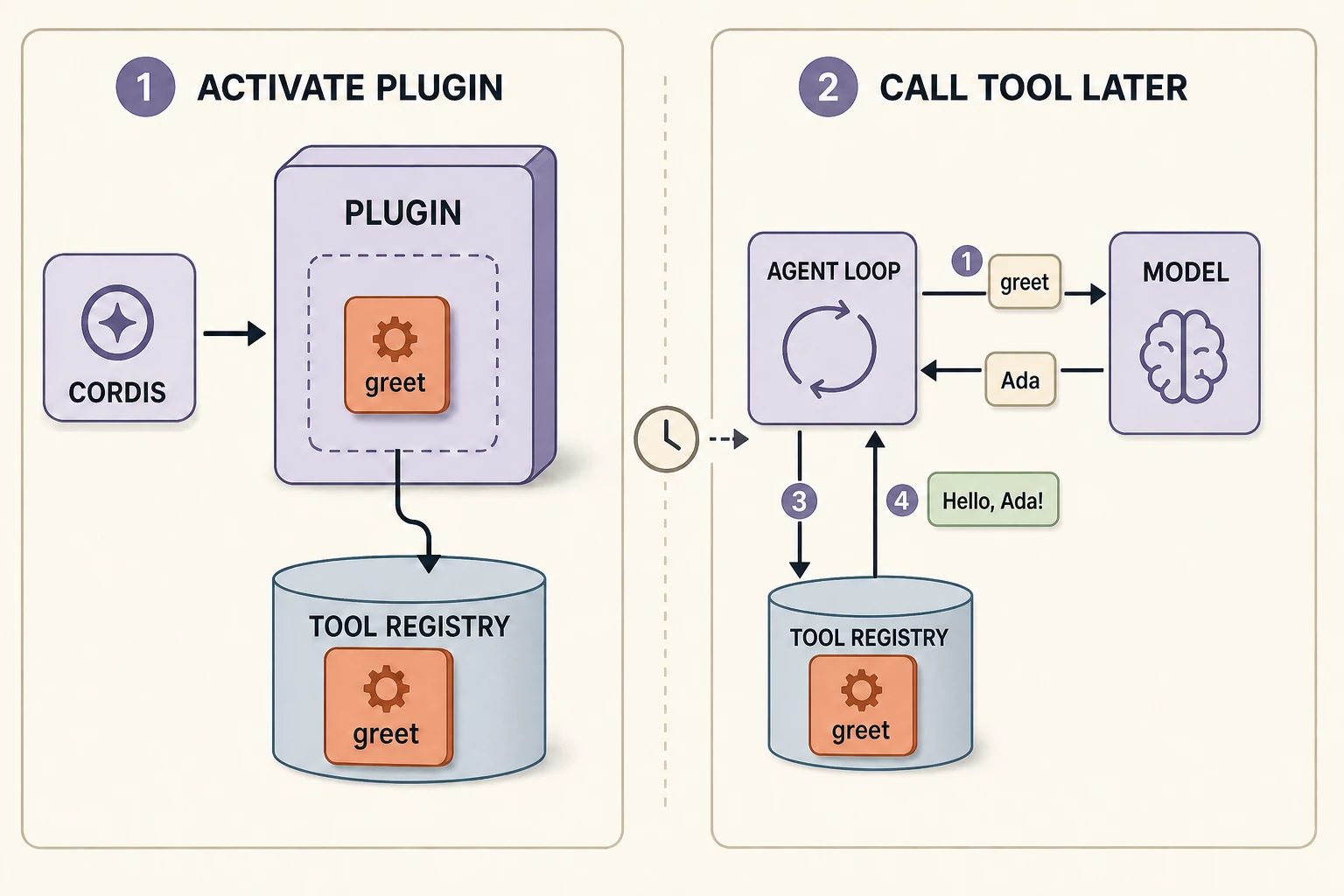
Figure 3. The large runtime unit on the left is the Plugin; greet is the smaller Tool definition it registers. Later, Agent Loop coordinates the model’s Tool Call with the existing Tool Registry.
The boundary between Plugin and Tool is now explicit:
| Plugin | Tool | |
|---|---|---|
| Concrete object in the example | The greet-tool TypeScript module | The greet definition passed to ctx.tools.register |
| Primary audience | The running system and Cordis | The model and Tool Runtime |
| When it starts mattering | When Cordis mounts and activates it | When its schema is exposed, then when the model calls it |
| What it can do | Provide or consume Services, register Tools and listeners, own resources | Describe and execute one model-requestable action |
| Lifetime | Managed by its Context and dependencies | Registered for as long as the owning Plugin remains active |
One Plugin may register several Tools, one Tool, or no Tool. A persistence Plugin or user-interface Plugin can participate in the application without exposing any action to the model. Conversely, a Tool cannot load itself or declare its own place in the runtime graph. A Plugin must put it there.
5. DeepSeek Harness applies these Cordis rules to the Agent Loop itself
DeepSeek Harness uses Cordis for more than third-party additions. Its shipped Plugin configuration includes separate entries for Session, the Tool Registry, model access, the default Agent Loop, and many Tool providers. They enter the system through the same loader and lifecycle model as the small greet-tool module.
At the fixed commit, the default Agent Loop is a Cordis Service subclass with five required dependencies:
export class AgentLoop extends Service {
  static inject = ['agents', 'sessions', 'llm', 'tools', 'systemPrompt'];

  constructor(ctx: Context, config: Config) {
    super(ctx, 'agentLoop');
    // ...
  }
}
The Loop is a Plugin because Cordis mounts it, waits for its required Services, gives it a Context, and owns its teardown. The Loop also provides the named agentLoop Service after activation. Its central job does not place it outside the Plugin model.
The production Bash integration follows the same shape as greet, only with more dependencies. Its Plugin injects tools, shell, systemPrompt, and shellEnv, then registers a bash Tool. The model sees the Tool’s name, description, and parameters. The Plugin uses the current Shell Service and participates in prompt, policy, and cleanup behavior that the model never sees.
Cordis lets DSH replace core responsibilities through named Service seams. It activates consumers only while their dependencies are valid and removes registrations with the Plugin that owns them.
The same model imposes costs. The dependency graph is dynamic, so debugging may require checking which provider exists in the current Context and which consumer has been deactivated. Replacement implementations must honor timing and cleanup contracts as well as method names. Plugins are trusted same-process code, so Cordis composition is not a sandbox or a security boundary.
In summary, Cordis manages same-process Plugins. Plugins cooperate through Services, inject, events, and Effects. A Tool is one model-facing contribution a Plugin may register.
Article three explains Turns and Sessions; article four then follows how Profiles, capability providers, consumers, scopes, and the Agent Loop are assembled into one running Agent: “How Is an Agent Assembled? Inside DeepSeek Harness’s Cordis Architecture”